Case study · a design practice project by Danila Kolbasin
A practice tool for design decisions. Not an AI that designs.
This is a practice project for designers, not an AI design tool. The site makes no AI calls: the four practice cases are written in advance.
As the tool says on its first screen: “Directions are pre-written: drafted with AI, edited by me.”
- Practice tool
- No live AI
- No sign-up
- Stays in your browser
AI can draft design options in seconds. Choosing one, and saying why, is still the designer’s job. This tool trains that part.
How a round works
- 1
Pick a case
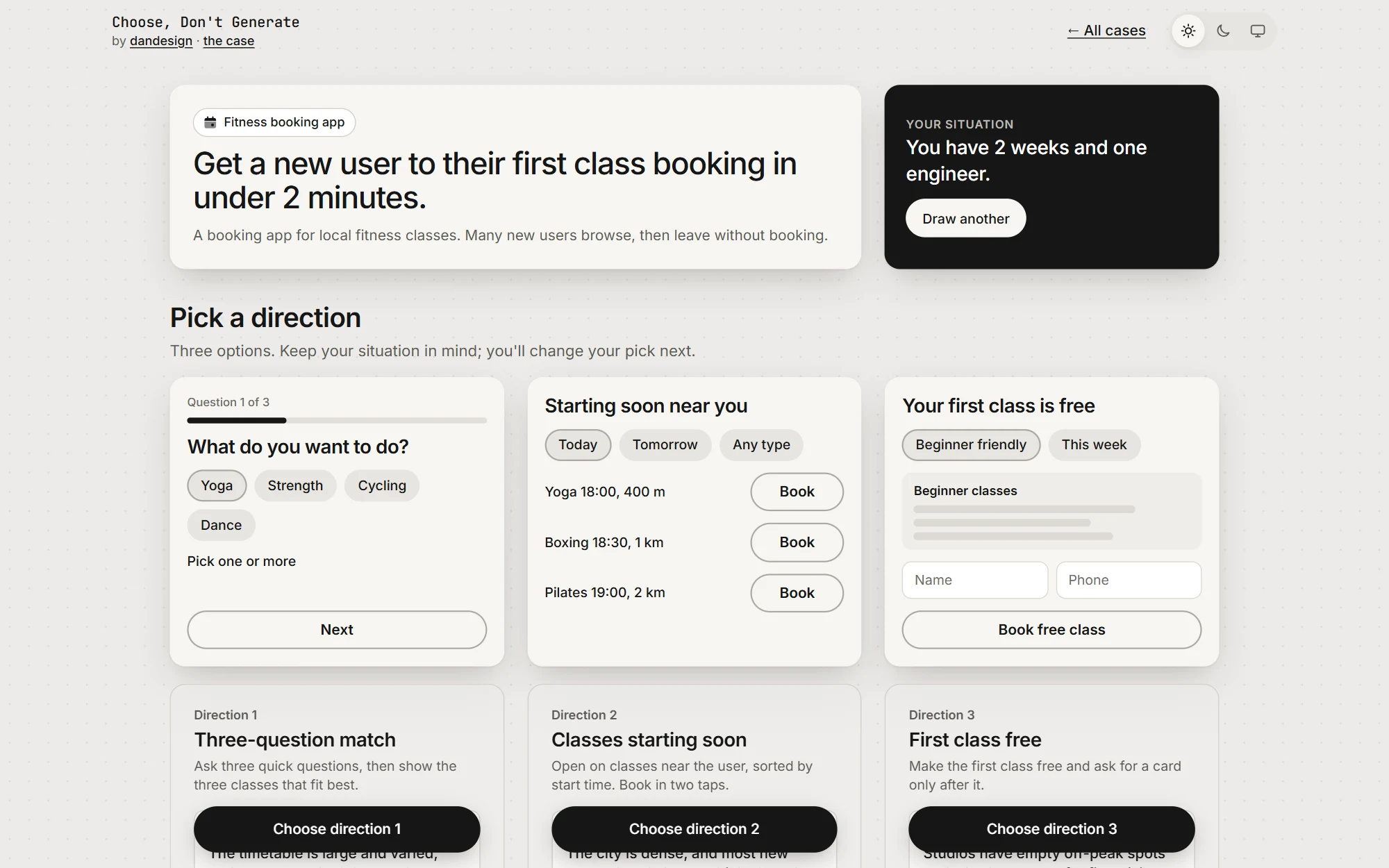
For example, a fitness app: get a new user to their first booking in under 2 minutes.
- 2
Get a situation
Drawn at random, like “You have 2 weeks and one engineer.”
- 3
Choose and change
Pick one of three directions, each with a sketch and its trade-offs. Change it to fit the situation.
- 4
Say why
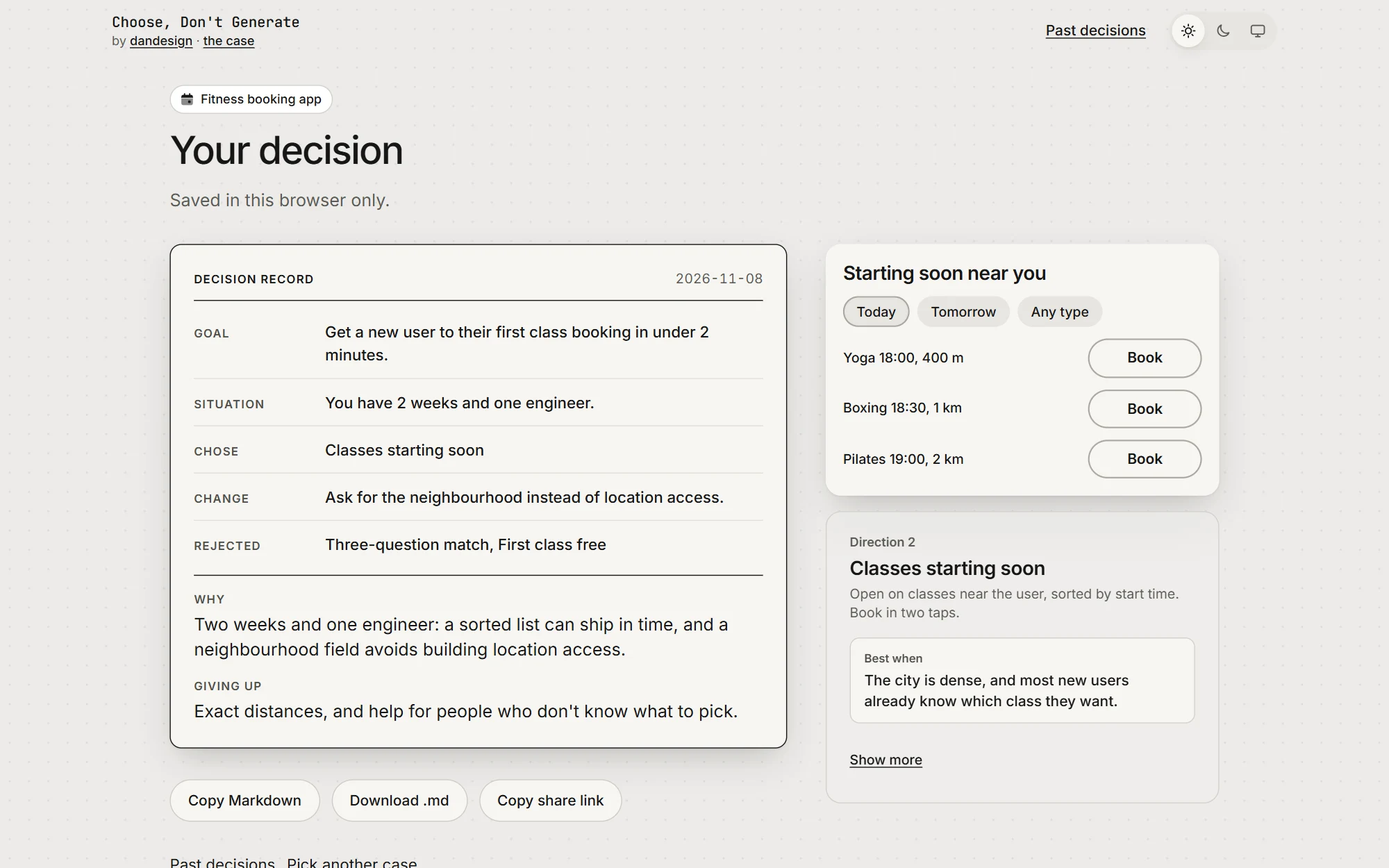
Write why, and what you give up. You keep it as a decision record.
One case, one situation, three directions. The situation changes which one is right.
What it trains
Three habits that AI can’t do for you, practised in short rounds.
Choosing for a situation
The same case has a different best answer with 2 weeks or 2 months. You learn to argue from the constraint, not from taste.
Saying why in plain words
Answers that are too short are blocked with a hint. A reason has to point at something real.
Naming the cost
Every choice gives something up. Writing it down is what makes a decision you can defend later.
Why it matters to a product team
- Fewer decisions argued twice.The record holds the goal, the situation, what was chosen and rejected, why, and the cost. That is a format a team can reuse in reviews and handoffs.
- Sharper design reviews.A 90-second round is a warm-up for critique: people practise reasoning from a constraint before they discuss real work.
- Onboarding and interviews.Junior designers see that “right” depends on the situation. A hiring team can read how someone reasons, not only what they make.
- Using AI without giving up judgment.AI makes the options; a person chooses and signs the reason. Every screen says who drafted what.
What you keep: a decision record. Copy it as Markdown, download it, or share a read-only link.
These are the uses I designed it for. It hasn’t been tested with teams yet.
How I built it
I directed an AI coding agent, Claude Code, with a short rulebook and five review gates where it had to stop and wait for me. I chose the four cases, edited all 12 direction cards, approved 12 situations and 24 changes line by line, and set the look. The agent wrote the code and the first drafts.
- 6 working days
- 3 versions
- 74 commits
- 8 merged pull requests
- React, TypeScript, Vercel
Two decisions that shaped it
Decision recordv2 · 4 Nov
My own test showed I was making reasons up
- Situation
- Version 1 asked “Why this one?”. On a made-up case, nothing is at stake, so the reason was made up too.
- Chose
- A random situation card, and a step to change the chosen direction. Now the question is “Why this change?”.
- Gave up
- One more step. The time goal moved from 60 to 90 seconds.
Decision recordv3 · 5 Nov
“Why is the AI fake?” without paying for AI
- Situation
- Live AI on my API key meant cost, abuse on a public site, and a long wait.
- Chose
- “Your own case”: copy a ready prompt into your own AI, paste the answer back. The site still calls nothing, and those screens say “Drafted by your AI”.
- Gave up
- Two app switches and a paste. Quality depends on your AI.
What real AIs did with it
The morning after “Your own case” was built, I ran three test goals through ChatGPT, Claude and Gemini.
-
Does it work with any AI?
Yes. All three answers read into three directions, with sketches drawn from their text, and go through the normal flow.
-
What did real use find that my checks didn’t?
ChatGPT’s own copy button squashes each block into one long line. Most ChatGPT users would have hit this. The reader now splits the text at each label.
- 2 reader fixes
- 17 saved test answers
-
Does the AI change the quality?
A lot. Claude came closest to my edited cards, with real numbers and honest costs. Gemini used hype words and wrote a situation that gave the answer away. That is why those screens say “Drafted by your AI”.
- Quality varies
- Labelled on every screen
-
Did it change my own cards?
Yes. Seeing real cards side by side, I moved “Best when”, the line that decides, above the gains and costs on every card, so people read it before the lists.
- “Best when” first
- 12 cards updated
Limits and next steps
There are no usage numbers: the site has no analytics, by design, and I haven’t tested it with real users yet. Next, I want to watch a few designers use it. Do the situations change their choices? Do their reasons get more specific?